 Help Center
Instagram isn’t just a platform for sharing selfies and food pics anymore; it’s also a hotbed for hackers and scammers looking to pull a fast one. If you think your Instagram account is safe, think again. Here’s the lowdown on Instagram hacks and scams, how to prevent them, and what to do if you’ve already fallen victim.
What Are Instagram Account Hacks and Scams?
Welcome to the wild world of Instagram shenanigans! Here’s what’s lurking behind those seemingly innocent DMs and flashy posts:
-
Phishing Scams: Ever get a random message from someone saying your account is about to be suspended unless you “verify” your login details? Classic phishing. Scammers trick you into providing your username and password on fake login pages, giving them the keys to your digital kingdom.
-
Fake Giveaways: Who doesn’t love free stuff? Scammers know this, so they set up fake giveaways and sweepstakes that require you to enter your personal info or pay for shipping costs. Spoiler alert: you won’t be winning anything but a lesson in caution.
-
Imposter Scams: Imagine an account that looks like your favorite influencer or a major brand. They slide into your DMs with exciting offers or sponsorships that require upfront payments or personal details. Fake followers and flashy promises are their game.
-
Fake Merchandise: Think you’re buying a luxury handbag at a steal? Scammers set up shop with counterfeit goods that look too good to be true. They’ll take your money and you’ll get anything from knockoffs to nothing at all.
-
Crypto and Investment Scams: The allure of quick cash is strong. Scammers flaunt their “success” on Instagram and lure you into investing money with promises of sky-high returns. Guess what? You’ll see nothing but your money disappearing into the ether.
-
Romance Scams: Love is blind, and scammers know it. They’ll craft a fake profile to build a relationship with you, only to hit you up for money when they’ve got you hooked.
-
Fake Job Opportunities: Looking for a side gig? So are scammers, who post alluring job ads that require you to fork over personal details or pay upfront costs. The only job you’ll be getting is dealing with identity theft.
How to Prevent Instagram Account Hacks and Scams
Stay ahead of the curve and keep your Instagram experience safe with these handy tips:
-
Think Before You Click: Always double-check links before clicking. Scammers love to create fake login pages that look just like Instagram’s. If you receive a suspicious link, hover over it to see where it’s actually leading.
-
Spot the Red Flags: If an offer sounds too good to be true, it probably is. Be wary of accounts that ask for personal information, money, or direct you to external sites for any “exclusive deals.”
-
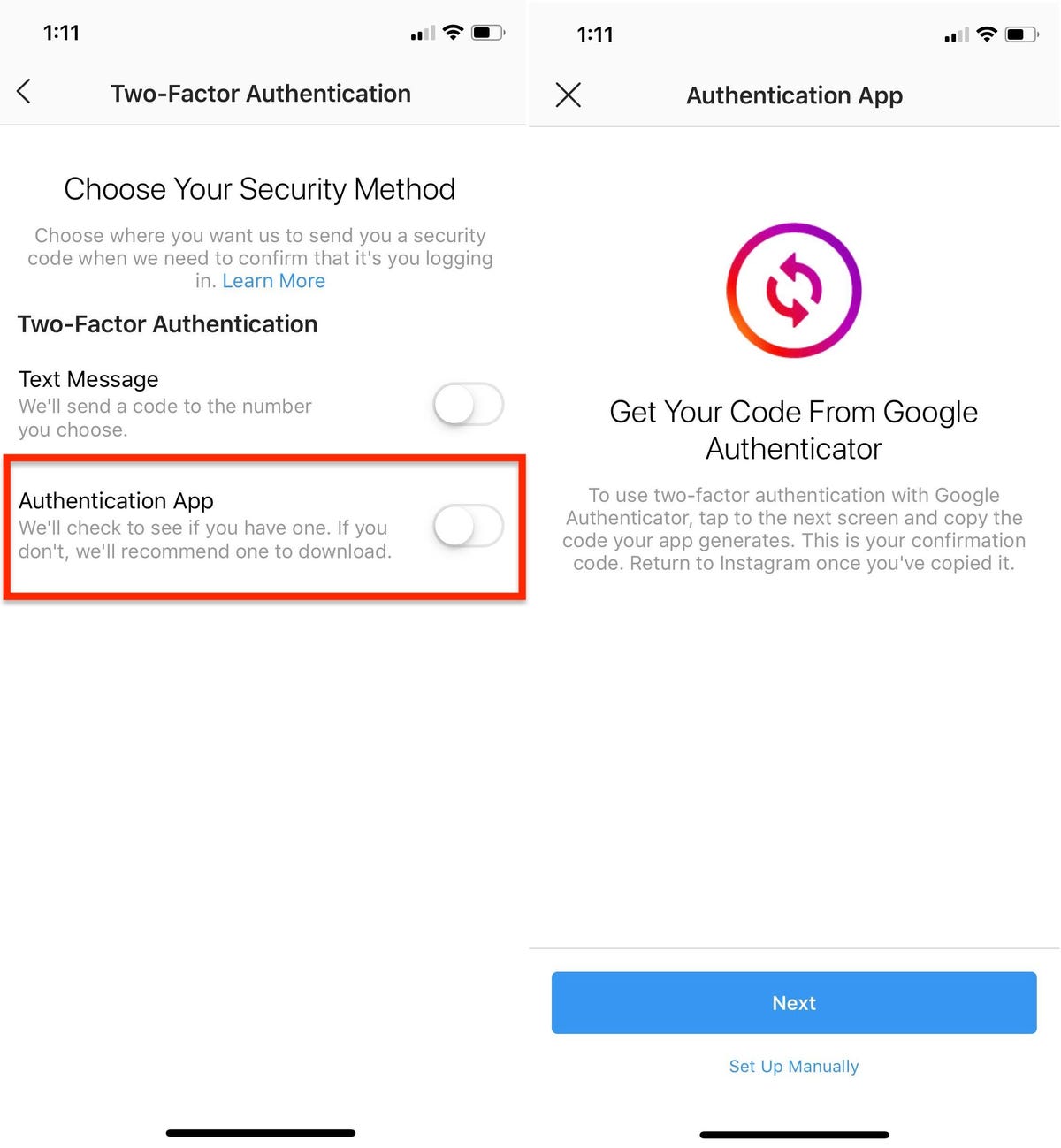
Enable Two-Factor Authentication (2FA): Think of 2FA as a digital bouncer for your account. It requires an extra step to log in, like a code sent to your phone. This added layer of security can thwart even the savviest of scammers.
-
Check the Verified Badge: When dealing with brands or influencers, look for the blue checkmark next to their name. It’s a sign that the account is verified and legitimate.
-
Be Careful with Third-Party Apps: Apps that connect to Instagram might look harmless but can sometimes be a gateway for scammers. Regularly review and manage these apps through your account settings.
-
Regularly Monitor Your Account: Keep an eye on your login activity and any unusual changes to your account. If something seems off, it’s better to act fast.
What to Do If You Fell for a Scam
If you think you got scammed, don’t panic. Here’s your action plan:
-
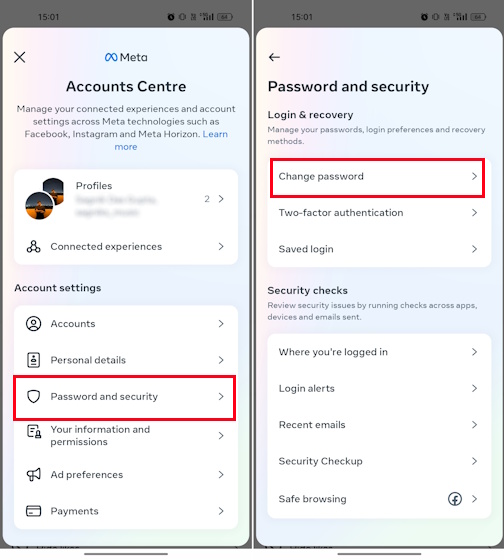
Change Your Password: Immediately update your password to something strong and unique. If you used the same password elsewhere, change those too.
-
Notify Instagram: Report the scam account or phishing attempt to Instagram’s support team. This helps prevent the scammer from targeting others.
-
Check for Fraudulent Activity: If you’ve shared financial details or personal info, monitor your bank accounts and credit reports for any unusual activity. Consider placing a fraud alert with your financial institution.
-
Seek Professional Help: If you’re dealing with significant financial loss or identity theft, consider consulting with a cybersecurity expert or legal advisor.
-
Learn and Share: Spread the word about what happened to you. Awareness is key in preventing others from falling victim to the same scams.
What to Do If Your Account Was Hacked
-
Change Your Password: Immediately update your password to something strong and unique. If you used the same password elsewhere, change those too. Alternatively, you can send yourself a password reset email. Afterwards, turn on 2FA.
-
Secure Personal Details and Related Accounts: Confirm your phone number and email address in account settings are correct, check Accounts Center to remove any linked accounts you don’t recognize, and revoke access to any suspicious third-party apps.
-
Check Your Email Account for a Message from Instagram: If you got an email from security@mail.instagram.com saying your email address has been changed, you might be able to reverse this change of address by clicking "Secure My Account" in the message. If other details were also changed, like your password, and you can't change back your email, you can request a login link or security code from Instagram.
-
Request a login link from Instagram: To verify that the account belongs to you, you can ask IG to send a login link to your email or phone number. Here’s how to request a login link:
- On the login screen, tap Get help logging in.
- Enter your username, email, or phone number linked to the account, then click Send login link.
- Complete the captcha to prove you're human, then click Next.
- Open the login link in the email or text (SMS) you receive and follow the on-screen instructions.
- Follow Instagram's Recovery Guidelines: If you're unable to log in, visit this page on a mobile device to submit a support request and secure your account.
Stay sharp and keep your Instagram experience fun and scam-free. With the right knowledge and precautions, you can enjoy your social media without falling prey to the tricksters of the digital age.