 Help Center
TikTok isn’t just a hub for viral trends and entertaining videos—it's also a prime target for cybercriminals looking to exploit unwary users. Whether you're posting daily dance challenges or sharing your favorite recipes, keeping your TikTok account secure is crucial. Here’s everything you need to know to prevent hacks and scams and what to do if you become a victim.
What Are TikTok Account Hacks and Scams
Understanding the threats to your TikTok account is the first step to safeguarding it. Here’s a look at the types of issues you might face:
TikTok Account Hacks
-
Unauthorized Access: Hackers may steal your password and gain access to your account. Once inside, they might alter settings, post unwanted content, or spam your followers.
-
Phishing Attacks: Cybercriminals might send fake messages pretending to be from TikTok, asking for your login details or tricking you into clicking harmful links.
TikTok Scams
-
Fake Contests and Giveaways: Scammers create enticing offers or contests that require you to share personal information or make payments. These are designed to deceive you into giving away your details or money.
-
Impersonation Scams: Fraudsters might impersonate TikTok support or influencers, tricking you into sharing personal information or clicking on malicious links.
How to Prevent TikTok Account Hacks and Scams
Securing your TikTok account involves a series of practical steps to keep it safe from cyber threats:
- Use a Strong, Unique Password: Choose a password that combines uppercase and lowercase letters, numbers, and special characters. Avoid common passwords and consider using a password manager to keep track of your credentials.
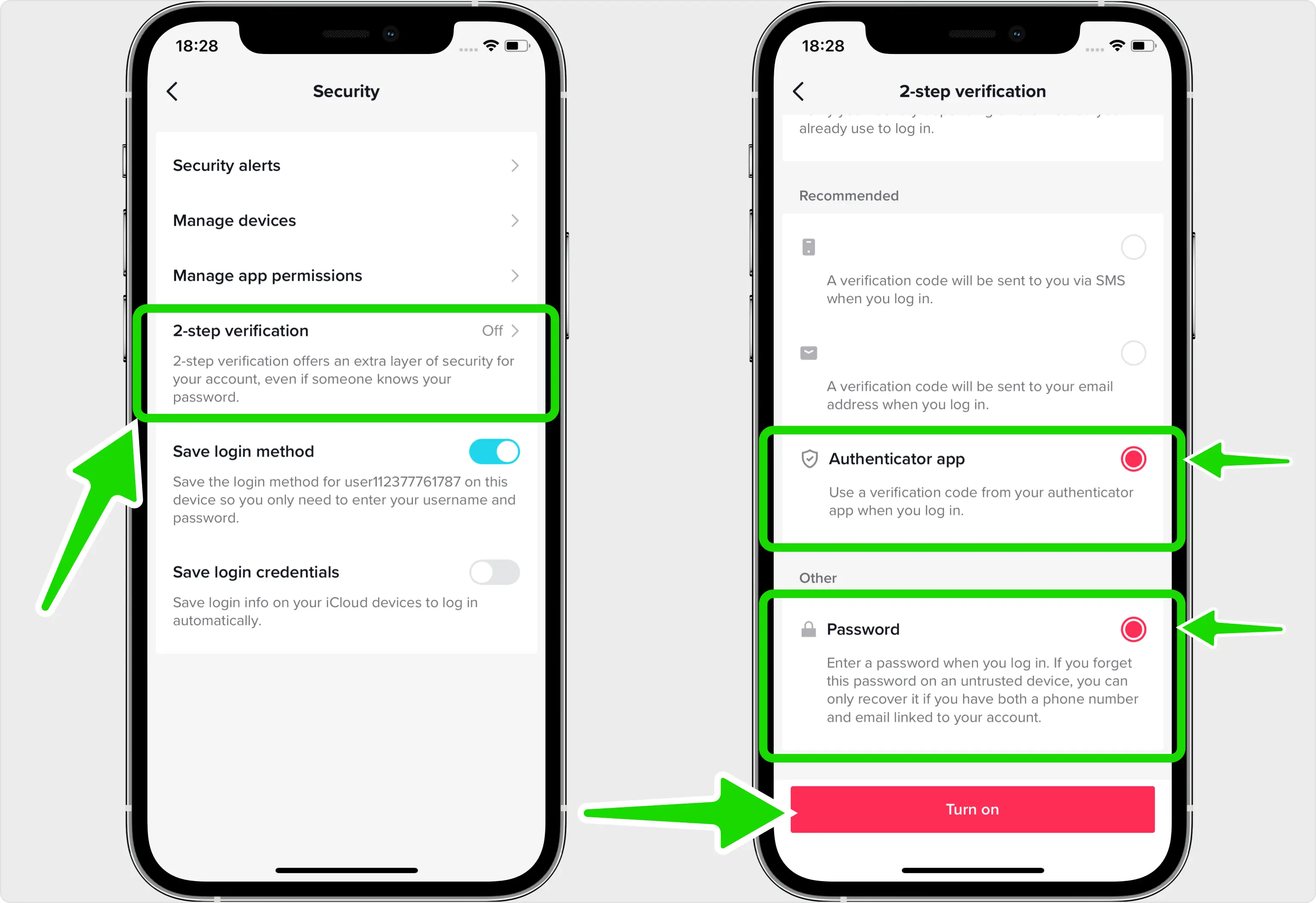
- Enable Two-Factor Authentication (2FA): Adding an extra layer of security through 2FA can significantly reduce the risk of unauthorized access. Set it up in TikTok’s settings by choosing a verification method such as an SMS code or an authenticator app.
- Be Cautious: Always verify the authenticity of any communication you receive. If you get an email or message asking for your login details, don’t click on links or download attachments. Visit TikTok’s official website or app directly to address any issues.
- Regularly Monitor Your Account Activity: Check your account settings and login activity to spot any unauthorized access or changes. Keep an eye on your account’s device management section to review and remove any unfamiliar devices.
- Review App Permissions: Regularly audit which third-party apps have access to your TikTok account. Revoke access to apps that you don’t recognize or that seem unnecessary.
- Be Skeptical of Too-Good-to-Be-True Offers: If you come across a contest or deal that seems too amazing to be real, verify its legitimacy. Check the official website or social media channels of the company or contest organizers before taking any action.
- Stay Informed About Security Practices: Keep up with the latest security news and updates from TikTok. Follow tech blogs and cybersecurity experts to stay aware of new threats and best practices for online safety.
What to Do If You’re a Victim of TikTok Account Hack or Scam
If you find that your TikTok account has been compromised, acting quickly can help mitigate the damage:
- Change Your Password Immediately: Update your password to something strong and unique. If you’re locked out of your account, use TikTok’s password recovery process to regain access.

- Link Your Phone Number:
- In the TikTok app, tap Profile at the bottom
- Tap the Menu ☰ button at the top
- Tap Settings and privacy
- Tap Account
- Tap User Information and then select Phone number
- Link your phone number
- Remove Suspicious Devices:
- In the TikTok app, tap Profile at the bottom
- Tap the Menu ☰ button at the top
- Tap Settings and privacy
- Tap Account
- Select Manage devices
- Remove unwanted or suspicious devices
- Report the Issue to TikTok: Use TikTok’s Help Center to file a report about the hack or scam. Provide detailed information, including screenshots if possible, to assist their support team in resolving the issue. Alternatively, you can also try and reach Tiktok's support by sending them an email to support@tiktok.com.
- Inform Your Followers: Let your followers know about the breach. This warning can prevent them from falling victim to scams or malicious messages that may have been sent from your account.
- Scan for Malware: Run a comprehensive scan on your device with a trusted antivirus program to detect and remove any malware that may have been installed during the breach.
- Update Your Security Settings: After securing your account, revisit and strengthen your security settings. Re-enable 2FA, update your security questions, and review connected apps and devices.
- Monitor for Future Issues: Continue to keep an eye on your account for any unusual activity. Regular monitoring helps you catch and address any further issues promptly.
- Seek Professional Help If Needed: If the situation is overwhelming or you're unsure how to proceed, consider consulting a cybersecurity professional for expert assistance.
Summary
Securing your TikTok account involves more than just setting a strong password. It requires vigilance, proactive measures, and quick action if things go wrong. By following these steps, you can protect your account from potential threats and enjoy TikTok with peace of mind. Stay informed, stay cautious, and keep creating confidently!